

用户与权限:绑定产品权限后仍然无权限访问产品页面
最近更新时间: 2026-06-30 15:06:00
故障现象场景描述
绑定产品权限后仍然无权限访问产品页面。
故障定位分析
确认权限策略是否正常:运营端查看对应的策略语法是否包含页面访问的动作和接口。
确认数据库中策略信息是否正常:
登录cam数据库,在cExtension表中根据uin查该用户绑定的策略,查看 actionName 中,有无用户所需的接口;若无,则在 cServicePerm 表中,根据serviceType查找接口对应服务的数据,查看apiEnName中,有无用户所需的接口。dbsql_info dbsql-tcenter-cam-cauth/dbsql-tcenter-ocloud-cam-cauth select * from cExtension where uin='xxx' and actionName like "%xxx%"\G select * from cExtension where uin=xxx and strategyId in (xxx); select * from `cServicePerm` where serviceType='xxx'\G select * from cServicePerm where serviceType in (xxx); select * from cServicePerm where permId in (xxx) and apiEnName like '%xxx%'\G select distinct permId from cStrategyPerm where strategyId=xxx;查看策略信息是否正常:在 cStrategy 表中查看所绑定的策略名详情信息。
set names latin1
select * from cStrategy where strategyName = 'xxx访问管理权限'\G
select * from cStrategy where  strategyInfo like '%xxx%'\G
select * from cStrategy where strategyId="xxx";
检查策略绑定任务记录信息:
通过 jobdetail 表,查看策略绑定的记录是否有异常。select * from cExtendJobDetail where uin=xxx; select * from cExtendJobDetail where uin=xxx order by updateTime desc limit 10;同时确认通过用户组添加的权限策略记录是否有异常。
select * from cReceiverInfo where uin=xxx; // uid
select * from cGroupMemberInfo where uid=xxx; // groupId
select * from cExtendJobDetail where groupId in (xxx) order by updateTime desc limit 20; //
select * from cRelatedStrategy where groupId=xxx;
进一步通过请求复现问题进行分析:
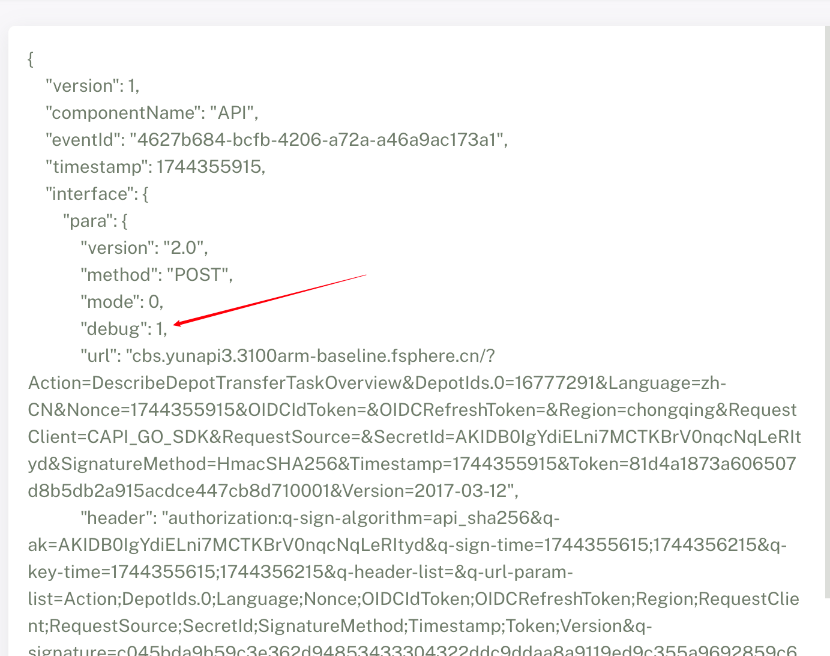
- 使用出问题的账号操作出问题的动作,然后使用没有权限的requestId在cam-auth组件中查询日志。
- 待查询到日志,修改日志的内容,填加 "debug": 1。
- curl 127.0.0.1:9502 -d'' ,使用修改后的参数发起请求。
故障应急处置步骤
- 若预设数据权限策略缺失,需手动更新preset组件。
kaleido_preset update /data/tce_dc/software/lastest/preset/preset-xxx
若数据存在脏数据,需进行清理。
- 备份原数据:
tad job dbBackup --servicebindings=dbsql-tcenter-cam-cauth tad job dbBackup --servicebindings=dbsql-tcenter-ocloud-cam-cauth- 删除cServicePerm中脏数据。
- 重刷preset组件:
kaleido_preset update preset-- 检查cStrategyPerm和cExtension中是否引用正确。