

示例工程开发
最近更新时间: 2026-06-30 15:06:00
Kyuubi目前支持beeline,jdbc,Rest以及Thrift四种接入方式。在1.6.0版本中Rest方式只支持spark-jar包任务的提交、日志获取、状态查询和任务中断功能。针对于beeline和jdbc的接入方式,在Kyuubi不同隔离级别下:任务的中断功能当前还无法支持。比如在K8s环境,非CONNECTION隔离级别下,无法直接通过Kyuubi关闭任务,需要通过调用K8s的相关接口直接关闭容器的方式关闭任务,这种方式对于共享Engine下的使用方式也不友好。在升级到1.7.1+的版本后,Kyuubi提供了通过Rest接口可以实现sql级别的任务控制。
主流的Kyuubi使用方式有三种:Beeline,JDBC,Rest批任务。
Beeline
>klist -kt /var/krb5kdc/xxx.keytab -- 用户kerberos认证keytab >kinit -kt /var/krb5kdc/xxx.keytab xxx@xxx -- 用户的principal >klist
并通过kyuubi.engine.share.level=CONNECTION指定了隔离级别为CONNECTION >cd /usr/local/service/kyuubi >bin/beeline -u "jdbc:hive2://172.16.12.14:10009/default;principal=hadoop/tbds-4ewgkc73@TBDS-MD3Y2ZV9(需要使用KyuubiServer的kerberos);#kyuubi.engine.type=SPARK_SQL;kyuubi.engine.share.level=CONNECTION;" 3.使用zookeeper 方式: /usr/local/service/kyuubi/bin/beeline -u "jdbc:hive2://{zookeeper-ip}:2181/default;serviceDiscoveryMode=zooKeeper;zooKeeperNamespace=kyuubi;#kyuubi.engine.type=SPARK_SQL;kyuubi.engine.share.level=CONNECTION;" |
JDBC
JDBC的方式,目前Kyuubi支持使用Hive-jdbc SDK,也可用通过Kyuubi提供的jdbc SDK与Kyuubi建立连接。
- pom引入依赖
        <dependency>
           <groupId>org.apache.kyuubi</groupId>
            <art
            ifactId>kyuubi-hive-jdbc-shaded</artifactId>
            <version>1.8.0-incubating</version>
        </dependency>
        或者
        <dependency>
            <groupId>org.apache.hive</groupId>
           <artifactId>hive-jdbc</artifactId>
            <version>3.1.3</version>
        </dependency>
- 参考demo编写程序通过JDBC与Kyuubi建立连接。
  package com.tencent.kyuubi.demo.jdbc.hive;

import java.sql.*;
import java.util.List;
import java.util.concurrent.TimeUnit;
import org.apache.hadoop.conf.Configuration;
import org.apache.hadoop.security.UserGroupInformation;
import org.apache.kyuubi.jdbc.KyuubiHiveDriver;
import org.apache.kyuubi.jdbc.hive.KyuubiQueryResultSet;
import org.apache.kyuubi.jdbc.hive.KyuubiStatement;
import org.slf4j.Logger;
import org.slf4j.LoggerFactory;

public class KyuubiHiveJDBCTest {
    public static Logger LOG = LoggerFactory.getLogger(KyuubiHiveJDBCTest.class);
    public static String HIVE_DRIVER = "org.apache.hive.jdbc.HiveDriver";
    public static String KYUUBI_DRIVER = KyuubiHiveDriver.class.getName();

    public static KyuubiStatement stmt;
    public static void main(String[] args)
            throws SQLException, InterruptedException {
        String url = args[0];
        String userPrincipal = args[1];
        String userKeytab = args[2];
        String krb5File = args[3];
        String user = args[4];
        LOG.warn("## parameter url:{}",url);
        LOG.warn("## userPrincipal :{}",userPrincipal);
        LOG.warn("## userKeytab :{}",userKeytab);
        LOG.warn("## krb5.conf :{}",krb5File);
       loadingHiveKrbConfig(userPrincipal,userKeytab,krb5File);
        try {
            Class.forName(KYUUBI_DRIVER);
        } catch (ClassNotFoundException e) {
            e.printStackTrace();
            System.exit(1);
        }
        try {
            Connection con = DriverManager.getConnection(url, user, "");
            stmt = (KyuubiStatement) con.createStatement();
            stmt.execute("select 1;");

            try {
                LOG.info("## statement handle {}","null");
                KyuubiQueryResultSet resultSet = (KyuubiQueryResultSet)stmt.executeQuery("select 1");
                while (resultSet.next()) {
                    String id = resultSet.getString("1");
                    LOG.warn("## job id:{}",id);
                    LOG.warn("## "+resultSet.toString());
                }
            }catch (Exception e) {
                e.printStackTrace();
            }

            String tableName = "KyuubiTestByJava";
            try {
                stmt.execute("drop table if exists " + tableName);

} catch (Exception e) {
                e.printStackTrace();
            }

            List<String> execLog = stmt.getExecLog();
            for(String log:execLog) {
                LOG.warn("## drop table sql exec log: {}",log);
            }

            try {
                stmt.execute("create table " + tableName +
                        " (key int, value string)");
                LOG.warn("## Create table success!");
            } catch (Exception e) {
                e.printStackTrace();
            }
            execLog = stmt.getExecLog();
            for(String log:execLog) {
                LOG.warn("## create table sql exec log: {}",log);
            }

            // show tables
            String sql = "show tables '" + tableName + "'";
            LOG.warn("## Running: {}" , sql);
            ResultSet res = stmt.executeQuery(sql);
            if (res.next()) {
                LOG.warn(res.getString(1));
            }
            execLog = stmt.getExecLog();
            for(String log:execLog) {
                LOG.warn("##show table sql exec log: {}",log);
            }

            // describe table
            sql = "describe " + tableName;
            LOG.warn("## Running: {}" , sql);
            res = stmt.executeQuery(sql);
            while (res.next()) {
                LOG.warn(res.getString(1) + "\t" + res.getString(2));
            }
            execLog = stmt.getExecLog();
            for(String log:execLog) {
                LOG.warn("##desc table sql exec log: {}",log);
            }

            sql = "insert into " + tableName + " values (42,\"hello\"),(48,\"world\")";
            stmt.execute(sql);

            execLog = stmt.getExecLog();
            for(String log:execLog) {
                LOG.warn("## insert table sql exec log: {}",log);
            }

            sql = "select * from " + tableName;
            LOG.warn("## Running: {}" , sql);
            res = stmt.executeQuery(sql);
            while (res.next()) {

LOG.warn(String.valueOf(res.getInt(1)) + "\t"
                        + res.getString(2));
            }
            execLog = stmt.getExecLog();
            for(String log:execLog) {
                LOG.warn("##select table sql exec log: {}",log);
            }

            sql = "select count(1) from " + tableName;
            LOG.warn("## Running: {}" , sql);
            res = stmt.executeQuery(sql);
            while (res.next()) {
                LOG.warn(res.getString(1));
            }
            execLog = stmt.getExecLog();
            for(String log:execLog) {
                LOG.warn("##select count sql exec log: {}",log);
            }

        } catch (Exception e) {
            e.printStackTrace();
        }

        Thread.sleep(10*60*1000);

    }
    /**
     * krb 配置
     */
    public static void loadingHiveKrbConfig(String userPrincipal,String userKeyTab,String krb5File) {
        try {
            LOG.warn(" krb login");
           System.setProperty("java.security.krb5.conf", krb5File/*"/etc/krb5.conf"*/);
            Configuration configuration = new Configuration();
           configuration.setBoolean("hadoop.security.authorization", true);
           configuration.set("hadoop.security.authentication", "Kerberos");
           UserGroupInformation.setConfiguration(configuration);
            if (UserGroupInformation.isLoginKeytabBased()) {
               LOG.warn("UserGroupInformation.isLoginKeytabBased() is ture");
               UserGroupInformation.getLoginUser().reloginFromKeytab();
            } else {
               LOG.warn("UserGroupInformation.isLoginKeytabBased() is false");
               UserGroupInformation.loginUserFromKeytab(userPrincipal, userKeyTab);
            }
           LOG.warn("ticketCache=====>" + UserGroupInformation.isLoginTicketBased());
        } catch (Exception e) {
            LOG.error("krb 配置 失败:", e);
            e.printStackTrace();
        }
    }
}
REST批任务
- 引入Kyuubi Rest SDK。
        <dependency>
           <groupId>org.apache.kyuubi</groupId>
            <artifactId>kyuubi-rest-client</artifactId>
            <version>1.9.0</version>
        </dependency>
- 参考demo编写逻辑。
  package com.tencent.kyuubi.demo.http;

import com.typesafe.config.Config;
import com.typesafe.config.ConfigFactory;
import com.typesafe.config.ConfigValue;
import org.apache.hadoop.security.UserGroupInformation;
import org.apache.kyuubi.client.BatchRestApi;
import org.apache.kyuubi.client.KyuubiRestClient;
import org.apache.kyuubi.client.api.v1.dto.Batch;
import org.apache.kyuubi.client.api.v1.dto.BatchRequest;
import org.slf4j.Logger;
import org.slf4j.LoggerFactory;


import java.util.HashMap;
import java.util.List;
import java.util.Map;

public class KyuubiBatchJobSubmit {

    public static Logger LOG = LoggerFactory.getLogger(KyuubiBatchJobSubmit.class);
    static Config appConf = ConfigFactory.load();

    public static void main(String[] args) throws Exception {
        String kyuubiServer = appConf.getString("kyuubi.server");
        String user = appConf.getString("kyuubi.user");
        String passwd = appConf.getString("kyuubi.passwd");

        // 如果需要kerberos认证则执行下面的逻辑, you need kerberos authentication firstly
        //  option 1: run kinit to generate TGT cache before running this program
        //  option 2: set client.principal and client.keytab in application.conf
        if (appConf.hasPath("client.principal") && appConf.hasPath("client.keytab")) {
            String principal = appConf.getString("client.principal");
            String keytab = appConf.getString("client.keytab");
            LOG.info("login using principal: {} and keytab: {}", principal, keytab);
           UserGroupInformation.loginUserFromKeytab(principal, keytab);
        } else {
            LOG.info("login using TGT cache");
        }


        String kyuubiPrincipal = appConf.getString("kyuubi.principal");
        String[] parts = splitPrincipal(kyuubiPrincipal);
        if (parts.length != 3) {
            throw new IllegalArgumentException("Invalid kyuubi.principal: " + kyuubiPrincipal +
                    ", should be 3 parts like HTTP/hostname@REALM");
        }


        /***** spnegoClient ********/
        KyuubiRestClient spnegoClient = KyuubiRestClient.builder(kyuubiServer)

               .authHeaderMethod(KyuubiRestClient.AuthHeaderMethod.BASIC)

                .username(user)

                .password(passwd)
               .spnegoHost("tbds-172-16-16-4")
                .maxAttempts(2)
                .build();
        String appStatus = submitBatchJob(basicClient);
        LOG.info("Final Application Status: {}", appStatus);

}
    public static String[] splitPrincipal(String principal) {
        return principal.split("[/@]");
    }

    /**
     * 提交任务并轮询获取任务状态
     * @param client
     * @return
     * @throws Exception
     */
    public static String submitBatchJob(KyuubiRestClient client) throws Exception {
        BatchRestApi api = new BatchRestApi(client);
        BatchRequest req = buildBatchReq();
        Batch batch = api.createBatch(req);
        String batchId = batch.getId();
        String appId = batch.getAppId();
        String appStatus = batch.getAppState();
        LOG.info("batchId: {}, appId: {}, appStatus: {}", batchId, appId, appStatus);

        // PENDING, RUNNING, FINISHED, KILLED, FAILED, ZOMBIE, NOT_FOUND, UNKNOWN
        while (!isAppTerminated(appStatus)) {
            Thread.sleep(5000);
            batch = api.getBatchById(batchId);
            appId = batch.getAppId();
            appStatus = batch.getAppState();
            LOG.info("batchId: {}, appId: {}, appStatus: {}", batchId, appId, appStatus);
        }

        // INITIALIZED, PENDING, RUNNING, COMPILED, FINISHED, TIMEOUT, CANCELED, CLOSED, ERROR, UNKNOWN
        LOG.info("Batch status: {}", batch.getState());
        return appStatus;
    }

    public static boolean isAppTerminated(String appState) {
        if (appState == null) return false;

        switch (appState) {
            case "FAILED":
            case "KILLED":
            case "FINISHED":
                return true;
            default:
                return false;
        }
    }

    /**
     * 请求对象封装
     * @return {@link BatchRequest}
     */
    public static BatchRequest buildBatchReq() {
        Map<String, String> batchConf = new HashMap<>();
        for (Map.Entry<String, ConfigValue> kv : appConf.getConfig("batch.conf").entrySet()) {
            batchConf.put(kv.getKey(), kv.getValue().unwrapped().toString());
        }
        String appName = appConf.getString("batch.appName");    public static String[] splitPrincipal(String principal) {
        return principal.split("[/@]");
    }

    /**
     * 提交任务并轮询获取任务状态
     * @param client
     * @return
     * @throws Exception
     */
    public static String submitBatchJob(KyuubiRestClient client) throws Exception {
        BatchRestApi api = new BatchRestApi(client);
        BatchRequest req = buildBatchReq();
        Batch batch = api.createBatch(req);
        String batchId = batch.getId();
        String appId = batch.getAppId();
        String appStatus = batch.getAppState();
        LOG.info("batchId: {}, appId: {}, appStatus: {}", batchId, appId, appStatus);

        // PENDING, RUNNING, FINISHED, KILLED, FAILED, ZOMBIE, NOT_FOUND, UNKNOWN
        while (!isAppTerminated(appStatus)) {
            Thread.sleep(5000);
            batch = api.getBatchById(batchId);
            appId = batch.getAppId();
            appStatus = batch.getAppState();
            LOG.info("batchId: {}, appId: {}, appStatus: {}", batchId, appId, appStatus);
        }

        // INITIALIZED, PENDING, RUNNING, COMPILED, FINISHED, TIMEOUT, CANCELED, CLOSED, ERROR, UNKNOWN
        LOG.info("Batch status: {}", batch.getState());
        return appStatus;
    }

    public static boolean isAppTerminated(String appState) {
        if (appState == null) return false;

        switch (appState) {
            case "FAILED":
            case "KILLED":
            case "FINISHED":
                return true;
            default:
                return false;
        }
    }

    /**
     * 请求对象封装
     * @return {@link BatchRequest}
     */
    public static BatchRequest buildBatchReq() {
        Map<String, String> batchConf = new HashMap<>();
        for (Map.Entry<String, ConfigValue> kv : appConf.getConfig("batch.conf").entrySet()) {
            batchConf.put(kv.getKey(), kv.getValue().unwrapped().toString());
        }
        String appName = appConf.getString("batch.appName");
        String resource = appConf.getString("batch.resource");
        String mainClass = appConf.getString("batch.mainClass");
        List<String> args = appConf.getStringList("batch.args");
        return new BatchRequest("SPARK", resource, mainClass, appName, batchConf, args);
    }
}
打包发布
- 打包
以下使用 IntelliJ IDEA 说明示例工程代码编译过程。点击 IDEA 下方 Terminal 打开终端,切换到示例工程的 Spark 工程目录下,然后使用命令 mvn clean install 对工程进行打包,运行过程中可能还需要下载一些文件,直到出现 build success 表示打包成功。
通过打包
mvn clean package
或者idea上通过maven插件package进行打包
通过上述编译打包后,将在工程目录下 target 文件夹中看到打好的 jar 包,如图示中KyuubiDemo-1.0-SNAPSHOT-jar-with-dependencies.jar。
2. 开发机运行
- 准备用户:参考获取用户认证。若是 Kerberos 环境,需要将用户的 keytab 文件下载到本地,然后上传至开发机。这里将 test 用户的 test.keytab 文件上传至开发机的 /tmp 目录。
- 测试运行。
    # 1. Kerberos认证(Simple认证跳过该步)
[test@10 ~]$ klist -kt /tmp/test.keytab
Keytab name: FILE:/tmp/test.keytab
KVNO Timestamp           Principal
---- ------------------- ------------------------------------------------------
   1 11/22/2023 17:00:59 test@TBDS-CURPL8E5
   1 11/22/2023 17:00:59 test@TBDS-CURPL8E5
[test@10 ~]$ kinit -kt /tmp/test.keytab test@TBDS-CURPL8E5

# 2. 准备启动运行
[test@10 ~]$ java -jar KyuubiDemo-1.0-SNAPSHOT-jar-with-dependencies.jar "jdbc:hive2://172.16.12.14:10009/default;principal=hadoop/tbds-4ewgkc73@TBDS-MD3Y2ZV9;#kyuubi.engine.type=SPARK_SQL;kyuubi.engine.share.level=CONNECTION"   "test@TBDS-CURPL8E5" "/tmp/test.keytab" "/etc/krb5.conf"  "test"
- Ranger授权:参考Ranger授权,确保 test 用户具有提交到 yarn default 队列的权限。
程序运维监控
- 监控
登录 TBDS Manager 管控平台,点击“集群列表”,选择 Spark 程序运行所对应的集群。点击“集群服务”,点击 WebUI 地址跳转至 SparkHistory UI 界面。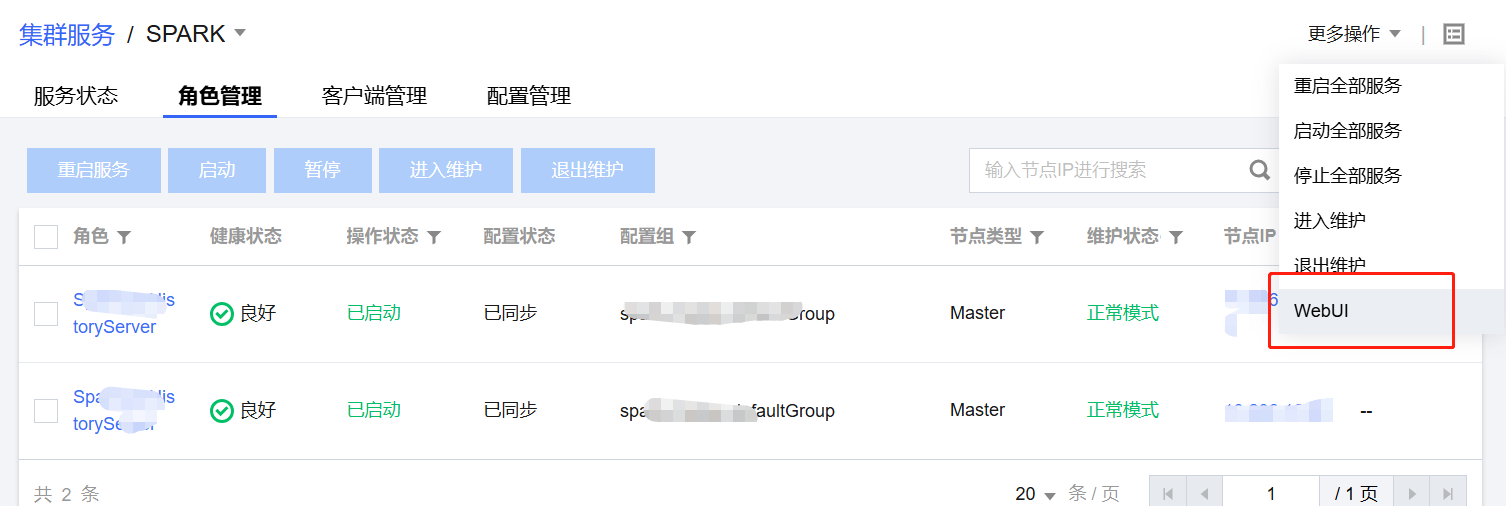
换成对应外网IP: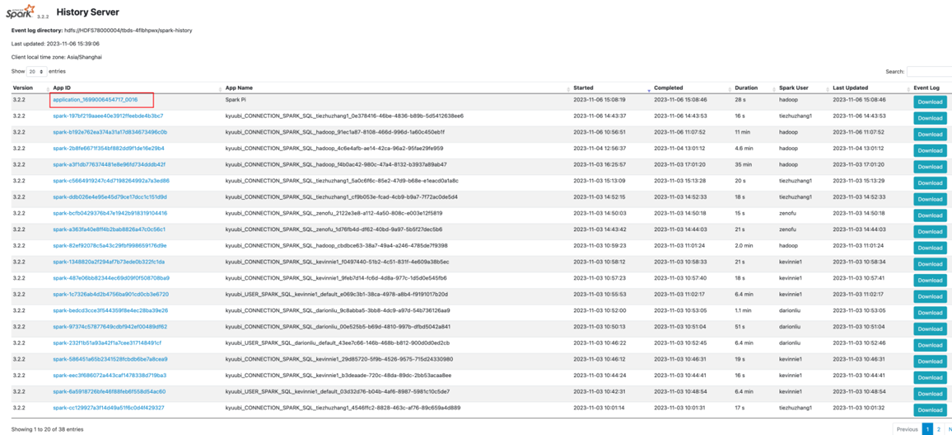
也可以YARN UI 页面根据 ApplicationID、User、Name 等信息,找到对应的Spark 任务。由于 Spark 任务的ApplicationID 在日志级别为 INFO 及以下才会输出至控制台,而 Spark 默认的日志级别为 WARN,可以根据任务启动后的日志等信息进行查找对应的 Spark 任务,点击 applicationID 链接,然后点击 Tracking URL 链接,跳转 Spark 作业监控页面。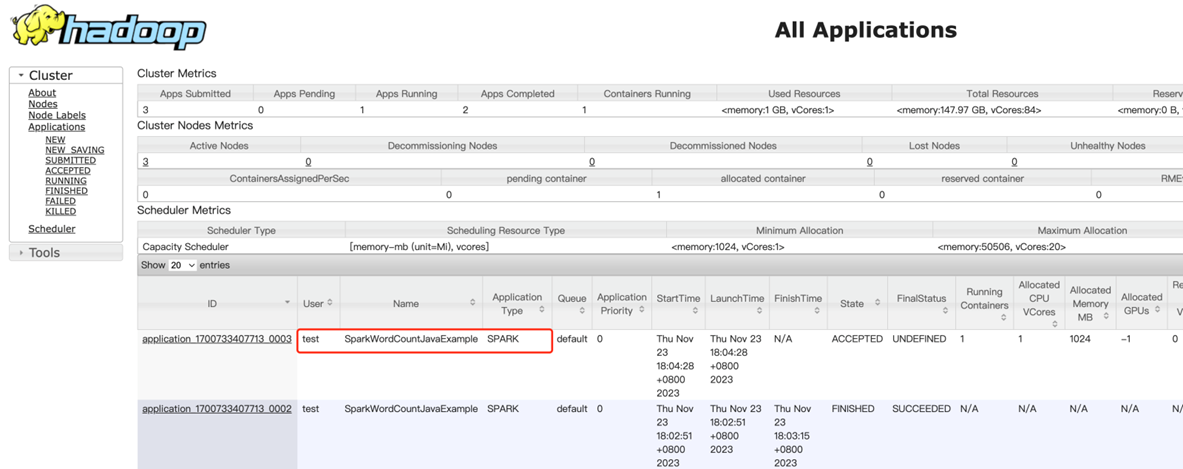
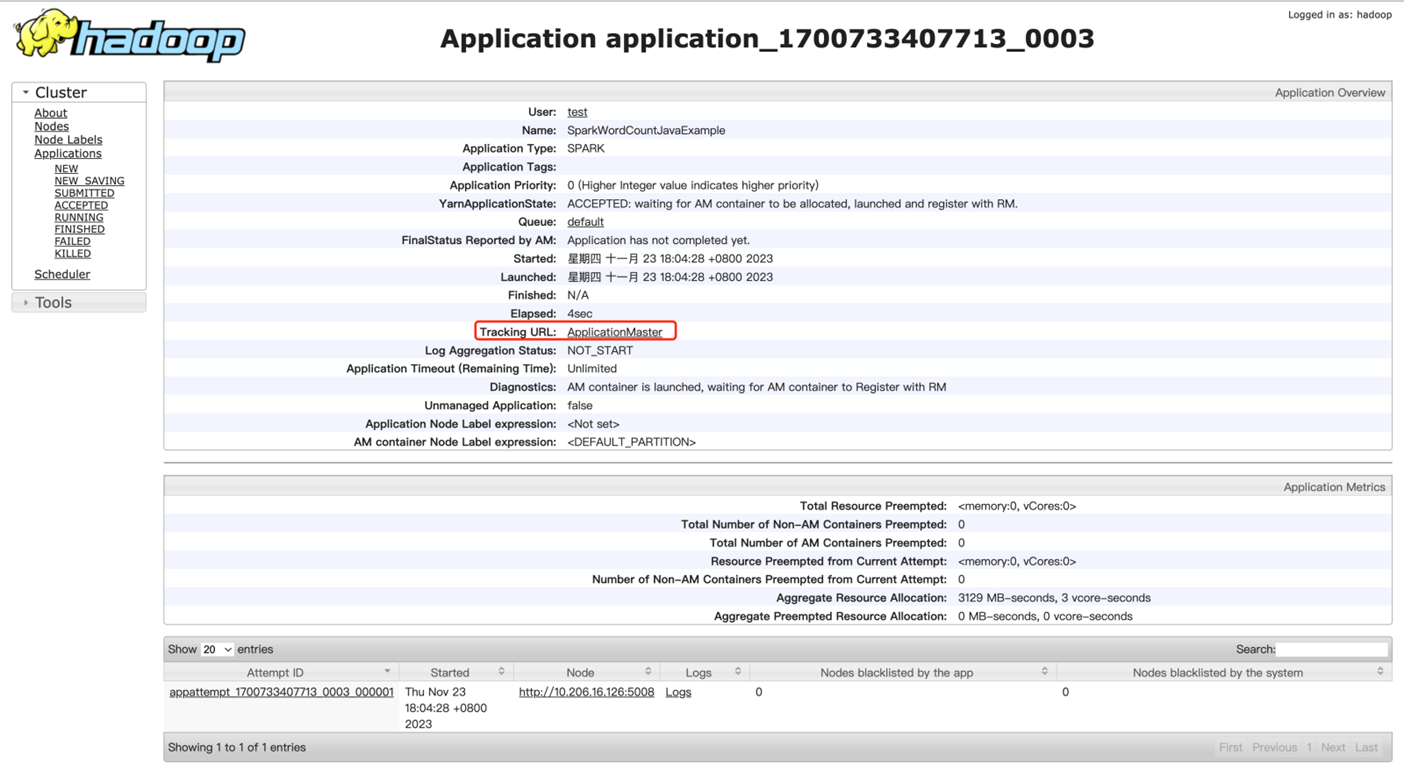
Spark 监控页面大致如下,更多介绍详见 Spark 官网。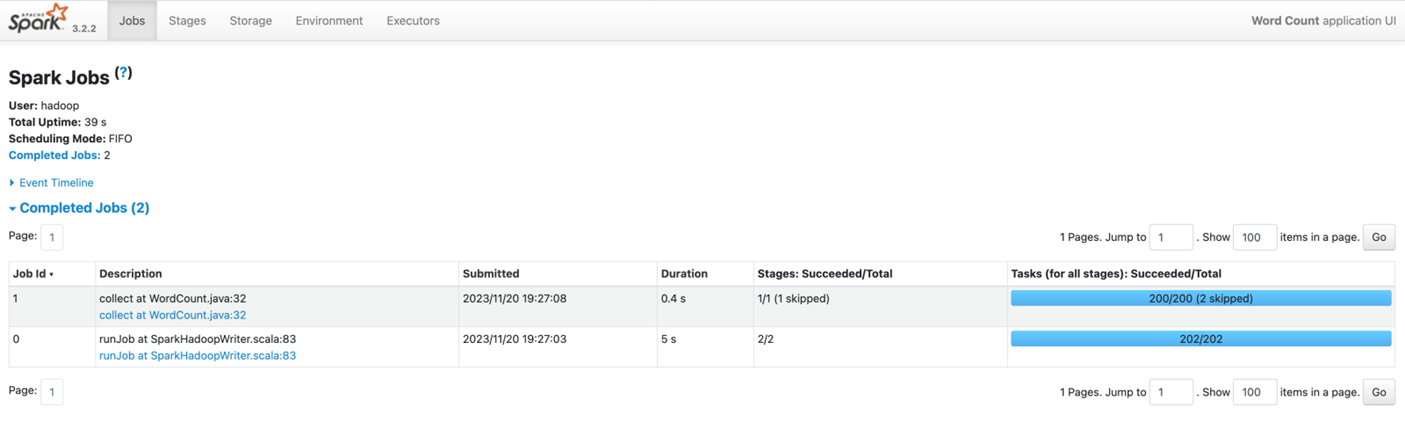
- 日志查看
若任务以 yarn client 模式提交,则日志将直接输出至控制台。若任务以 yarn cluster 模式提交,则需要到 YARN UI 页面根据ApplicationID、Name 等信息,找到对应的Spark 任务,点击 Logs 查看日志。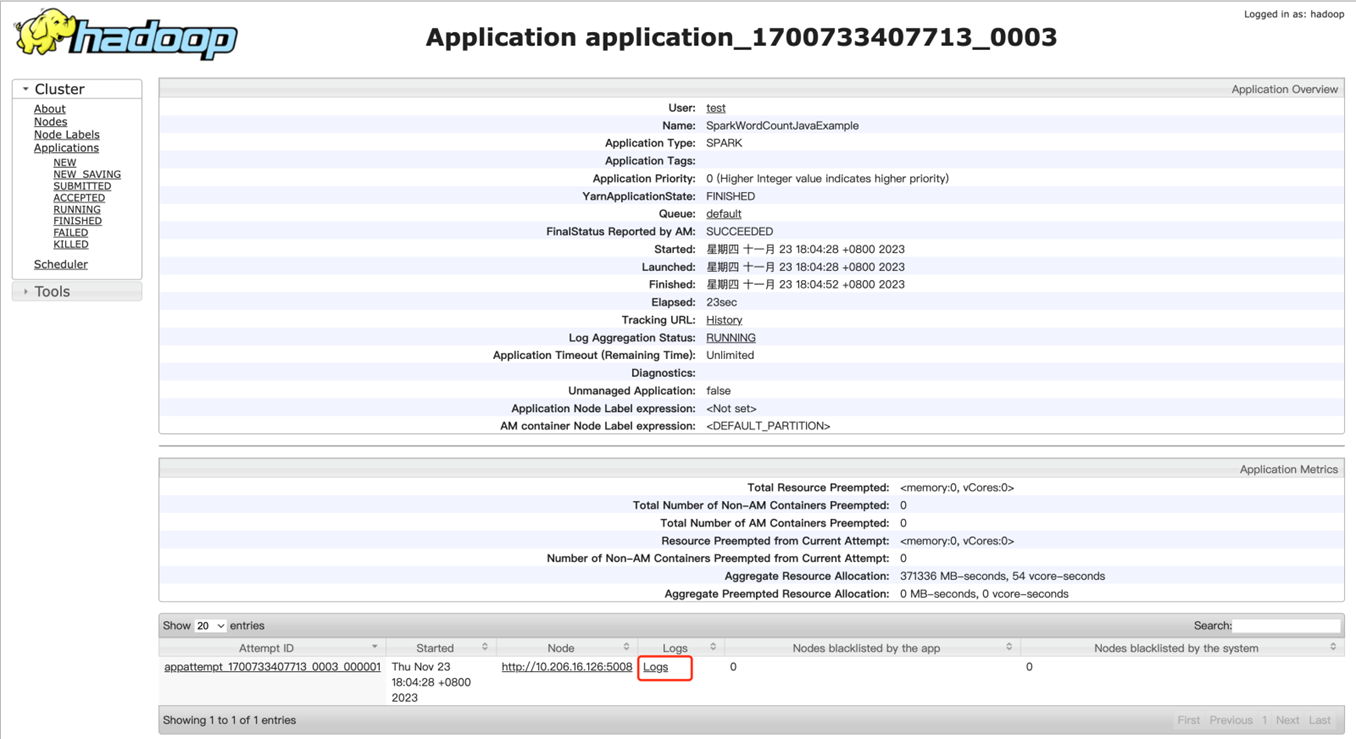
- 作业操作
与其它提交至 YARN 的任务类似,可以通过 YARN 相关命令查看、停止任务,参考常用命令。如通过命令 yarn application -kill 停止 Spark 应用;通过命令 yarn logs -applicationId 查看 Spark 任务日志(cluster 模式)。
